
ブログ記事が増えてきたときのために、検索できる機能を用意しておきたいところ、となると、記事にタグ付けをした検索の仕組みを用意したいです。これまで基本的に SSR でのサイト構築を行ってきましたが、
- 検索のたびにすべてのブログ記事の frontmatter を走査する
- 全記事のタグを表示しておき、押下することで検索できるようにする
といったことを考えたとき、画面表示ごとに処理をするのが非効率に思えます。
このため、ビルド時にタグを含む記事のメタデータを生成し、サイト表示に利用することを考えます。
各記事の mdx ファイルは"./app/routes/posts/"ディレクトリ以下に配置し、各ファイルの冒頭には以下のようなメタデータ(frontmatter)を設定しているとします。
---
title: vite pluginを作って、ビルド時の処理を実装する(記事のメタデータ一覧作成、タグ検索実装)
createdAt: 2024-10-03
tags: [vite, mdx, tag]
---

## 目的

ブログ記事が増えてきたときのために、検索できる機能を用意しておきたいところ、となると、記事にタグ付けをした検索の仕組みを用意したいです。これまで基本的に SSR でのサイト構築を行ってきましたが、

・・・・
vite のカスタムpluginとして、ビルド時の処理を構成できます。
vite.config.ts からデフォルトエクスポートする defineConfig に対して、実行時にパラメータとして渡されるcommandから、開発サーバなのか(serve)本番用ビルドなのか(build)を識別できるようになっています。
import { generatePostsIndexPlugin } from "./vite-plugins/generatePostsIndexPlugin";

export default defineConfig(({ command }) => {
  return {
    plugins: [generatePostsIndexPlugin(command)],
  };
});実装するプラグインの処理では、./app/routes/posts/配下の mdx ファイルを走査し、
- frontmatter を取得
- 記事の文字数をカウント
- 全記事のタグ数のカウント
などを行います。
frontmatter の取得にはgray-matterを使いますが、デフォルトでは日付を日付型として取得してしまい、やや扱いづらいためjs-yamlを指定し、文字列で取得できるようにします。
※vite でビルド時に使うものなので、開発環境向けにインストール(-D オプション)
npm i -D gray-matter js-yaml @types/js-yamlプラグインは、以下のように実装します。
- プラグインの関数は、Plugin 型を返すものとして実装
- 開発サーバ向けには
configureServerに、ビルド用にはbuildStartに実装
import { Plugin } from "vite";
import matter from "gray-matter";
import yaml from "js-yaml";
import fs from "fs";
import path from "path";
import { fileURLToPath } from "url";
import { IndexMeta } from "@/app/types";
const __filename = fileURLToPath(import.meta.url);
const __dirname = path.dirname(__filename);

const customYamlParser = (input: string) => {
  return yaml.load(input, { schema: yaml.JSON_SCHEMA }) as IndexMeta;
};

export const generatePostsIndexPlugin = (
  command: "serve" | "build"
): Plugin => {
  const base = {
    name: "generate-json-plugin",
  };
  if (command === "serve") {
    return {
      ...base,
      configureServer() {
        generateJson();
      },
    };
  } else {
    return {
      ...base,
      buildStart() {
        generateJson();
      },
    };
  }
};

/**
 * 記事のメタデータをjsonとして生成
 */
function generateJson() {
  // postsディレクトリ配下のmdxファイルのパスを取得
  const postsDirectory = path.resolve(__dirname, "../app/routes/posts");
  const fileNames = fs.readdirSync(postsDirectory);
  const mdxFileNames = fileNames.filter((fileName) =>
    fileName.endsWith(".mdx")
  );

  // gray-matterでMDXファイルのメタデータと内容をパース
  const matters = mdxFileNames.map((mdxFileName) => {
    const fileContent = fs.readFileSync(
      path.resolve(postsDirectory, mdxFileName),
      "utf8"
    );
    const { data, content } = matter(fileContent, {
      engines: { yaml: customYamlParser },
    });
    return {
      ...data,
      charCount: content.length,
      path: "/posts/" + mdxFileName.replace(".mdx", ""),
    } as IndexMeta;
  });

  // jsonとして出力
  fs.writeFileSync(
    path.resolve(__dirname, "../public/static", "postsIndex.json"),
    JSON.stringify(matters, null, 2),
    "utf-8"
  );

  const tags: string[] = matters.reduce((acc, cur) => {
    return cur && cur.tags ? acc.concat(cur.tags) : acc;
  }, [] as string[]);
  const uniqueTags = dedupAndSortTags(tags);

  // jsonとして出力
  fs.writeFileSync(
    path.resolve(__dirname, "../public/static", "uniqueTags.json"),
    JSON.stringify(uniqueTags, null, 2),
    "utf-8"
  );
}

/**
 * 重複排除及びソート
 * @param tags
 * @returns
 */
function dedupAndSortTags(tags: string[]): { tag: string; count: number }[] {
  if (tags.length === 0) {
    return [];
  }

  const dedupTags = tags.reduce((acc, cur) => {
    // すでに出現している要素なら、そのカウントを増やす
    // 初めて出現する要素なら、オブジェクトとして追加
    const found = acc.find((item) => item.tag === cur);
    if (found) {
      found.count += 1;
    } else {
      acc.push({ tag: cur, count: 1 });
    }
    return acc;
  }, [] as { tag: string; count: number }[]);

  const sortedTags = dedupTags.sort((a, b) => {
    // 出現回数が異なる場合は出現回数の降順でソート
    if (b.count !== a.count) {
      return b.count - a.count;
    }
    // 出現回数が同じ場合は値でソート(数値は昇順、文字列も辞書順)
    return String(a.tag).localeCompare(String(b.tag));
  });

  return sortedTags;
}あとは実行後のサーバ処理で、これらの生成済みデータを扱うよう実装すれば OK。
- トップページのレイアウト
import { css } from "hono/css";
import { jsxRenderer, useRequestContext } from "hono/jsx-renderer";
import Layout from "../components/Layout";
import { getCssTheme } from "../theme/theme";
import { ListHeader } from "../components/ListHeader";
import { TagSelector } from "../components/TagSelector";

export default jsxRenderer(({ children, title }) => {
  const c = useRequestContext();
  const yyyymm = c.req.query("yyyymm") ?? "";
  const tag = c.req.query("tag") ?? "";

・・・略・・・

  return (
    <Layout title={title ?? ""}>
      <div class={cssLayoutContainer}>
        // ヘッダ表示部
        <div class={cssLayoutHeader}>
          <ListHeader
            title={title ?? ""}
            queryCondition={{ tag: tag, yyyymm: yyyymm }}
          />
        </div>
        // タグ選択部
        <div class={cssLayoutTagSelector}>
          <p>タグを選択</p>
          <TagSelector />
        </div>
        <main class={cssLayoutMain}>{children}</main>
      </div>
    </Layout>
  );
});- ヘッダ表示部:現在の検索条件を表示します。
import { css } from "hono/css";
import { FC } from "hono/jsx";

type ListHeaderProps = {
  title: string;
  queryCondition: {
    yyyymm?: string;
    tag?: string;
  };
};

export const ListHeader: FC<ListHeaderProps> = async ({
  title,
  queryCondition,
}) => {

・・・略・・・

  const conditionDesc =
    (queryCondition.tag ? "タグ指定:" + queryCondition.tag : "") +
    (queryCondition.yyyymm ? " 期間指定:" + queryCondition.yyyymm : "");

  return (
    <header class={cssHeader}>
      <h1 class={cssTitle}>{title}</h1>
      <p class={cssQueryCondition}>
        {hasDefinedValue(queryCondition) ? conditionDesc : "全件を表示"}
      </p>
    </header>
  );
};

function hasDefinedValue(obj: Object) {
  return Object.values(obj).some((value) => value);
}- タグ選択部:全記事のタグ一覧を表示。クリックすると、選択したタグの記事のみを表示します。
import { css } from "hono/css";
import { FC } from "hono/jsx";
import { getCssTheme } from "@/app/theme/theme";
import uniqueTags from "@/public/static/uniqueTags.json";

export type TagSelectorProps = {};

export const TagSelector: FC<TagSelectorProps> = () => {
  const tagsWithHref = uniqueTags.map((tag) => {
    return { name: tag.tag, href: `/?tag=${tag.tag}`, count: tag.count };
  });

・・・略・・・

  return (
    <div class={cssRoot}>
      {tagsWithHref.map((tag) => {
        return (
          <div class={cssTag}>
            <a href={tag.href}>{tag.name + `(${tag.count})`} </a>
          </div>
        );
      })}
    </div>
  );
};- 各記事へのリンク一覧(_renderer.tsx 内で、children として渡される内容)
import { css } from "hono/css";
import { createRoute } from "honox/factory";
import { IndexMeta, Meta } from "@/app/types";
import postsIndex from "@/public/static/postsIndex.json";
import { Tags } from "../components/Tags";

export default createRoute(async (c) => {
  // クエリパラメータから検索条件を取得
  const yyyymm = c.req.query("yyyymm") ?? "";
  const tag = c.req.query("tag") ?? "";

  const yyyymmMatchRegex = new RegExp(`^/posts/${yyyymm}`);

  // mdxファイルとして作成したブログ投稿の一覧を取得する
  const posts = postsIndex as IndexMeta[];

  const filteredPosts = posts
    .filter(
      // 年月でフィルタ
      (post) => {
        return yyyymmMatchRegex.test(post.path);
      }
    )
    .filter(
      // タグでフィルタ
      (post) => {
        if (!tag) return true;
        return post.tags ? post.tags.includes(tag) : false;
      }
    );

・・・(略)・・・

  return c.render(
    <div>
      <ul>
        {/* 事前生成したブログ記事のメタデータ一覧からリンク一覧を作成 */}
        {filteredPosts.map((post) => {
          return (
            <li class={cssList}>
              <a class={cssLink} href={post.path}>
                {post.createdAt ?? "        "} : {post.title}
              </a>
              <div class={cssTags}>
                <Tags tags={post.tags} />
              </div>
            </li>
          );
          // }
        })}
      </ul>
    </div>,
    // 投稿一覧ページのメタデータを設定
    { title: "投稿一覧" }
  );
});
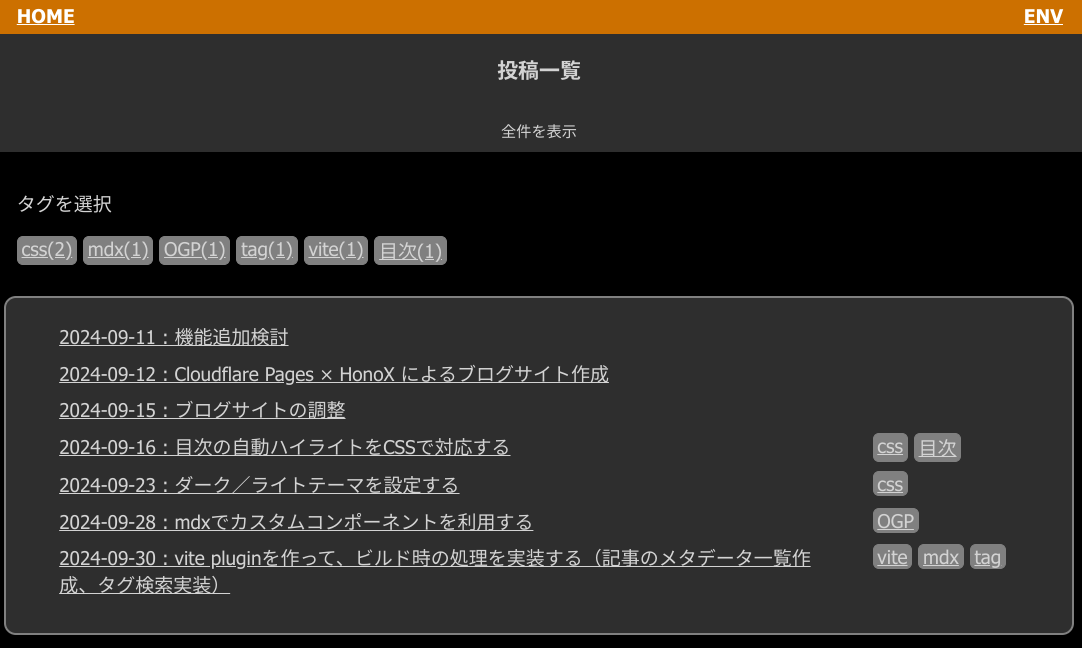
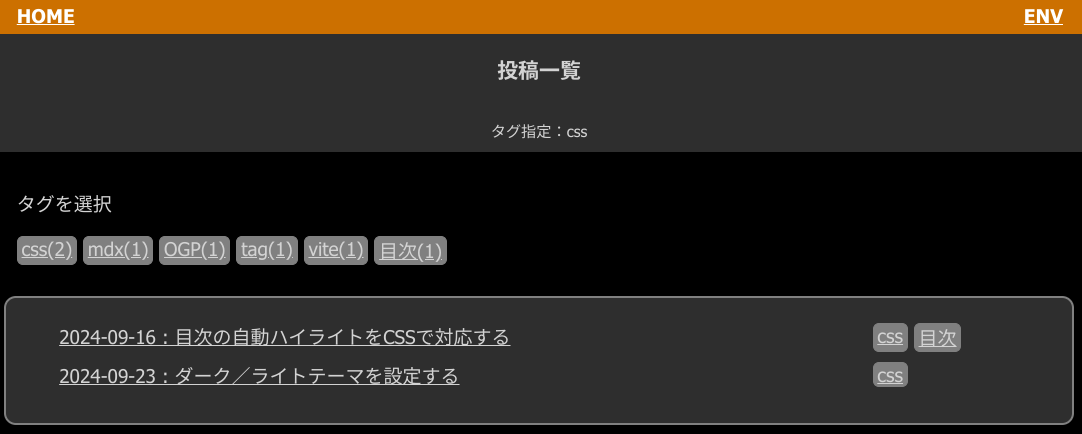
このようになりました。
- 一覧画面(タグ指定前)
- 一覧画面(タグ指定後)
ここまで設定して、開発環境上では問題なく動作していましたが、いざ cloudflare 上へデプロイしようとしたときに、ビルドエラーとなってしまいました。
[plugin:vite:resolve] [plugin vite:resolve] Module "node:async_hooks" has been externalized for browser compatibility, imported by "/workspaces/12-AWS/webclip-bot-plus/poc/99_honox_blog/node_modules/honox/dist/server/context-storage.js". See https://vitejs.dev/guide/troubleshooting.html#module-externalized-for-browser-compatibility for more details.
✓ 116 modules transformed.
x Build failed in 3.52s
error during build:
node_modules/honox/dist/server/context-storage.js (1:9): "AsyncLocalStorage" is not exported by "__vite-browser-external", imported by "node_modules/honox/dist/server/context-storage.js"
調べると、vite はブラウザ向けのビルドが基本となっており、nodejs 関係のモジュールが含まれているとエラーになることがあるらしい。 chatgpt 先生に教えてもらいましたが、そのとおりに vite の設定を修正するとエラーは出なくなりました。
このエラーは、honox の context-storage.js ファイルが AsyncLocalStorage を使用しているために発生しています。しかし、Viteはブラウザ環境向けにビルドを行っており、node:async_hooks モジュールがブラウザでは利用できないため、エラーが発生しています。

AsyncLocalStorage はサーバーサイド(Node.js)の機能であり、ブラウザ環境には存在しません。Vite がブラウザ向けにビルドする際、このモジュールがブラウザに対応していないためエラーを出しているのです。

解決策
SSR(サーバーサイドレンダリング)としてビルド
サーバーサイドとクライアントサイドの処理を分離する必要があります。Viteの設定でサーバーサイド用のビルドを行うように設定します。 vite.config.ts などに以下のような設定を追加して、サーバー向けビルドを行うようにします:

export default {
  build: {
    rollupOptions: {
      external: ['node:async_hooks'] // nodeのモジュールを外部化
    }
  }
}- カスタムの vite plugin を作成することで、ビルド時に行う処理を定義できます。
- frontmatter の抽出は gray-matter で行えます(日付型を避けるためには js-yaml も使用)。
- ビルド時に生成した情報を使って、ブログ記事のタグ検索を実装してみました。
- コメント -
- 関連記事 -





- 記事検索 -
このサイトではcookieを利用して、サイト訪問者の識別に利用します。 cookieの利用に同意いただくことで、サイト訪問者は記事のいいね機能等をご利用いただけます。 なお、サイト運営者はアクセス統計としてcookieの情報を利用する場合があります。